Showing posts with label canva. Show all posts

Tuesday, April 21, 2015

A Quick and Easy Way to Create Graphics

If you are into blogging, cool social media posts, or just like the idea of creating images & graphics for things (maybe invitations, posters, album covers, etc.) but you are not that great with Adobe Photoshop, InDesign, or Illustrator, then we have a savior for you.

Canva

If you are unfamiliar with Canva, for whatever reason, we we will give you a quick and easy tutorial of how to use it.

1. Sign up form account.


2. Choose a design template that you'd like to use. Canva conveniently labels them so you know what size works best for your project. There are more options than in this picture but we can only take screen shots that are so big, you know?


3. Choose your project. For this example, we will choose the "social media" template. There are templates for specific social media platforms, emails, marketing materials such as business cards, posters, flyers, menus, etc. You can also choose templates for documents and presentations, blogging & ebooks, events, advertising tools for both print and web. Yeah, you have a lot of options.


4. Get to creating. From here, you can choose your various options.


a. Layouts that are pre-designed. Some of the layouts are free to use and some cost $1. If you choose a layout, you can manipulate it how you want. You can change font, images, colors, etc.


b. Text. There are several text layouts that you can choose from, again, some are free and some cost $1. If you don't see that you like, you can add in your text that is structure-free. As a Chicago graphic design studio, even we approve of the text options they offer (although, they do offer Lobster and a few other iffy fonts…).


c. Backgrounds. Want a cool background? They have plenty of options, free and $1. Again, you can change the color of the background. Top left corner, you can see the color options (the + is so you can create your own color).
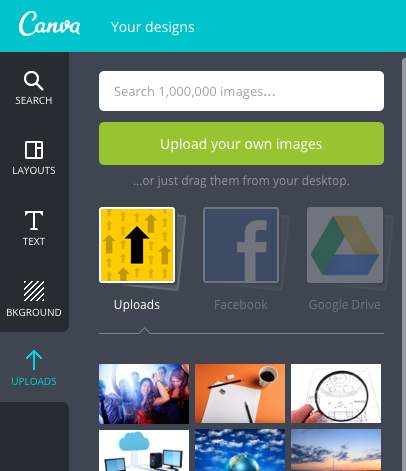


d. Uploads. You can upload your own photos to use in your creations, too! You can connect to Facebook and Google Drive to attach photos as well.


Are you excited to use Canva? We sure hope so! If you have any questions, don't hesitate to contact Integraphix, a Chicago graphic design agency with over 25 years experience.

Wednesday, February 11, 2015

Need a Boost for Your Social Media? Use Images. Here's Why

Digital marketing, especially social media marketing, has done a lot of changing over the years. One of the changes that has come to be in the last few years is the image & video centric posts for brands; without images or videos, brands are seeing the success of posts fall flat. This is a great time to think about finding great images or even creating images. Whether you are a Chicago graphic designer or just a social media enthusiast, creating or finding images does not have to be difficult.

Why do we need images with social media posts? Simply put: people like visuals. According to several trend reports, 65-85 percent of Americans claim to be visual learners; even away from learning, people like to look at pictures, watch videos, see colors, etc. If you remember this with your social media campaigns, then you will see a greater level of engagement with your posts compared to your posts that do not have visuals.

People have limited attention spans and little time to read through a lot of text. A good image can break the reader's skimming of the text, which is what you want, nay, need to happen so your posts on social media get read (hopefully before anyone else's). It is not very appealing to see a whole block of text, either. To counter this and break through the noise, images and videos help wonderfully.

Images help drive your message home. Having a well-picked and placed image can take the understandability of your message even further than wording can. Images are especially helpful with "How To" posts since you can show how something works or should be done with an image better than you often can with text. For example, if you were explaining a hammer so someone, would it be easier to simply show an image of one or write a description of a hammer?

So where can you find or create images?

  • Ing Image-- subscribe to the site and download up to 50 free images a month, must purchase beyond that. 
  • Canva-- very user friendly with easy-to-use tools. It is free to use, unless you use a component that must be purchased for $1 each. 
  • Shutterstock-- must purchase images. 
  • iStock-- must purchase images. 
Does your business need great images for its social media, blogs, or website? Then email Integraphix and see how our Chicago graphic design agency can help you!