Showing posts with label chicago graphic designers. Show all posts

Wednesday, October 29, 2014

4 Graphic Design Tips to Dominate Your Social Media

Great graphic design is not just for creating ads, logos, and mascots; great graphic design can help you dominate your social media marketing as well by giving your posts something to help them stand out.

When your posts have a great image to go along with them, they get more engagement! Why? For one thing, possibly the main thing, is that it gives your post an appealing visual besides just text. Another reason is because an image can help the message from your post be more complete.

Now, before you just jump into designing graphics and images for your social media posts. There are some prime rules that will help you nail this process down.

  1. Use contrast. Contrast will be great for making your images look sharp. It helps the text jump off the page and catch the eye. Colors that contrast well are not all that hard to choose, light and dark are the simplest ways to go. As a graphic design firm in Chicago, this is something we recommend to those who are venturing into graphic design for the first time. 
  2. Pick a font palette. If your company has a standard set of fonts, that is a great place to start. Having consistency with your fonts will really help build familiarity, great for branding! When you have a consistent set of fonts, it makes design easier and sleek. 
  3. Choose colors. Choosing a color scheme that is good for designs is sometimes hard but when you keep it consistent with your company's color scheme, it can also help with familiarity. Overall, consistency is key. Start with a couple colors and add more on from there; you want to avoid coming across as messy or confused with your colors. 
  4. K.I.S.S. - Keep it simple, Stupid! Sorry, you're not stupid but it's the acronym, you know? It can be very easy to get complex with images; you start with a cool, simple design and then just start adding in one cool thing after another. No, avoid that temptation. Keep the clutter to a minimum and make sure your message can be interpreted correctly! A professional graphic designer will always tell you that a messy graphic is a bad graphic, or they're a bad designer. Using too many fonts, colors, images, shapes, etc. should be avoided. 
Great graphic design can help any aspect of your business, even social media. Does your business need great graphics for social media? How about social media services? Email Integraphix or call us and chat with us about our services. 

Tuesday, August 12, 2014

Logo Design Trend Predictions for 2015

So many changes happen in the creative industry that if you step away for more than a minute, you'll have some catching up to do. When it comes to graphic design trends, they change constantly. The "cool" way to design something last year might not be so cool today. That being said, we are already thinking about the trends that graphic designers will fly to in 2015 (I know, it's crazy that we're already thinking about 2015).

The graphic design trends for logos in 2015 will be **drum roll**

The typography based logo
The typography based logo one that is entirely written. These logos exist already but it is predicted that they will flourish next year.


The incomplete logo
This one will make you think, "Is that the whole thing?" Yes, yes it is. It is as if the company made a logo, put it on a cutting board, then chopped part of it off.


Hand-drawn logos 
These look like they are hand-drawn, whether they actually are or not. Why this style? It is original and separate from things we have really seen before. These logos exist already but are not very common.


Letter stack logos
Instead of say the company name in one, horizontal line, the logos will separate the name into sections and then stack it all up. This one looks nice but can create difficulties saying the brand name if you have never seen it before.


Recurring patterns in the design 
This one is actually pretty cool. The logo will feature a design and then have it repeat; often times, the repetition of the design flows together so no part of the
repetition stands alone. As a Chicago graphic designer, this one is one of my favorites.


Transparent overlays

Typically done with shapes, each shape will look transparent and be influenced by the other sections of the logo. Example, having a red box and a blue box with the overlay in the middle being purple so it looks like each box is transparent. The same thing with circles, hexagons, etc.


Bright colors
Expect to see yellows, oranges, reds, and other bright colors be the norm.


Crests
They look preppy and edgy.


Geometric shapes
Using triangles, squares, and other geometric shapes will be a hit because we all like shapes, right?


Double meaning symbols
These are actually really cool; it is when the logo will incorporate something from the company into the logo and have it double as a letter, object, etc. Example: a sushi place using three chopsticks as the H in "SUSHI". Get it? This one can be done in a really sleek way if you find the right Chicago graphic design firm.


The negative space logo
Negative space is white space. Expect to see logos using white as the main color.

Wednesday, June 11, 2014

4 Quick and Easy Photoshop Tips for Beginners

Using Photoshop as a graphic designer is something you will do almost everyday, to some extent. Even if you do not use it a lot, you ought to know the basics if you want to be in graphic design. There are several basic tasks that you need to know to do.
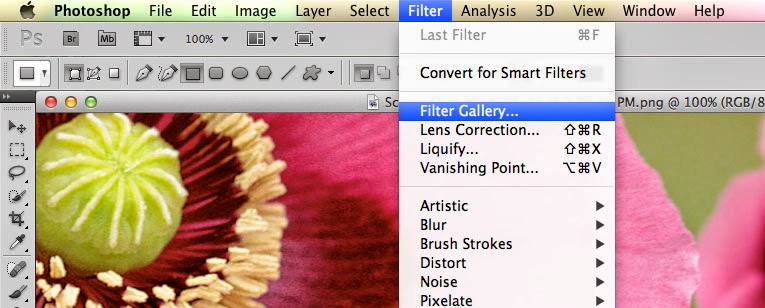
  • Filters. The filters are typically what we think of when we think of Photoshop, they are special effects that are applied to images to give them different looks. Each filter can draw out a different effect, color, or reduce those things. Filters work even better when you know how to pair them with other abilities of Photoshop. To get to the filters, simply look at the top menu bar, click Filter > Filter gallery > then choose a filter. 
  • Keyboard shortcuts. There are several keyboard shortcuts that will help you do your work even faster and look like a pro. 
    • V= move tool
    • F= flips through screens
    • Space= temp hand key
    • B= paintbrush
    • D= Sets the background/foreground colors as default
    • X= flips between foreground and background colors
    • E= Eraser
    • S= Stamp tool (also clone tool)
    • W=Quick selection
    • Ctrl+J= duplicates layer you have last selected
  • Color enhancing. Color is one of the main things you do with Photoshop, you want your photos to appear full of life and be attractive. Two of the main things you can do here are toggle with saturation and vibrance. Vibrance is the ability to increase the saturation of colors that are less saturated; so, it tends to balance out the color in a photo. Saturation is the ability to increase the intensity of all the colors in your image; so the intensity differences are still there but they're all more intense. 
  • Add sharpness and detail. Adding sharpness to your image can make it look much more detailed and awesome. If you are unsure of how much sharpness to add, then just add a little; if you add to much, it can make the photo look bad and that could have a worse effect than not sharpening at all. 
If you are looking for a graphic designer in Chicago, then contact Integraphix. We have done graphic design work for some of the top brands in Chicago and would love to help yours! 

Friday, March 28, 2014

How To Understand Colors and Their Impact Part 2

Yesterday we had a post about colors and how they can impact people emotionally, physically, and mentally. The reason for these posts is because as a graphic designer, you will be using color in your designs and sometimes, it will matter what colors you choose simply due to how they will affect your audience.


  • Orange (Orange): orange gives us a feeling of stimulation since it is a combination of yellow and red and affects us in an emotional and physical way. It allows our minds to think of things that bring us comfort, physically; it makes us think of things like food, warmth, shelter, etc. This is often seen as a fun color for our minds. 
    • When positive: orange gives us thoughts of comfort, food, warmth, security, passions, fun, good times etc. 
    • When negative: it can give us feelings of frustration, immaturity, and deprivation. 
  • Pink (Pink): Pink is a combination of red and white, however, due to the white, this color often soothes us instead of stimulating. It does often represent femininity, like a sense of feminine power. It can bring us feelings of nurturing. 
    • When positive: it brings us tranquility, nurturing, love, survival
    • When negative: it can make us feel inhibited, emasculated, weak
  • Grey (Grey): This color actually is pretty easy on the mind, it does not bring much to the mind in terms of emotion, mentality, or anything physical. It is a neutral color, for the most part. It is sometimes seen as suppressive and create a sense of hibernation. 
    • When positive: neutral. 
    • When negative: it can make us feel unconfident, damp, depressed, lethargic. 
  • Black (Black): Black often brings us considerable impact on our mind and body. It can make us feel protected and takes in all the energy around us. It can be negative in terms of enshrouding our personalities when there is too much of it around. However, it can help us see clearly because there are no distractions and give us a sense of sophistication. 
    • When positive: sophisticated, glamorous, secure, safe, efficient. 
    • When negative: oppressed, cold, menacing, heavy. 
Next time you consider the colors for a graphic design job, consider them carefully. If you have any questions about this, contact Integraphix - a Chicago graphic design studio. 

Monday, January 20, 2014

Graphic Designer Trends Found in 2014

So 2014 is here and has been so for a few weeks. So far, so good. However, like in almost every industry, we see that there are things that are changing for graphic designers. The trends for the industry are taking a slightly new turn this year; some of these trends started taking shape in 2013 but they will really own the graphic design world this year.

As people, we tend to like change in things like art, fashion, design, web, etc. There is just something boring about these industries when they tend to become static and pump out the same concepts and designs time after time.

What are these trends? Let's find out.


  • One of the biggest trends we are already seeing quite a bit of this year is that the simple designs are what people want. In the past, we saw a lot of designs for logos and graphics that included dimension, perhaps a lot of chaos and anything else you could throw at it. However, in 2014, that mindset for graphic designers is out and the simple stuff is in. Look at logos that are being created or redesigned this year and you will notice this to be true. For example, look at Google's logo; it used to have dimension but not it is flat and much more simple. Want to know what's interesting? It looks even better yet being simpler. 
  • The second trend is that logos will be more creative. Yes, they will be simpler (as well as other graphic design work) but they will speak more about the company instead of being something random. 
  • The third is that more natural looks are in and having a lot of photoshop is gone, baby, gone. This is particularly true for models; instead of taking photos of people with a lot of photoshop and other editing to place on websites and magazines, etc, people are opting for graphic design work that has few edits and looks much more natural. 
Bottom line, if you want to stay current in the industry this year, you'd better realize the new trends or risk being left out in the cold. If you have any questions about graphic design, then contact Integraphix - a Chicago graphic design firm. 

Tuesday, January 22, 2013

Design Strategies


*Picture in original design mock-up courtesy of iStockphoto*

As a design firm in Chicago, we rely on a variety of strategies to create successful design pieces. When our graphic designers take on a new graphic design project, one of the first questions asked is, “Who are we targeting with this piece?” Whether you are designing for certain groups or a demographic, designers always have the intent to grab their viewer’s attention by making sure their design is appealing to the group it will serve. A main goal throughout all of our projects is to capture the viewer’s attention at first glance.

Just recently we designed a mailer for one of our clients that featured a striking man with an odd facial expression. While they did not end up going with this design, we all found the image to be strong and felt it would make people take a second look.  What was the reason behind this design decision? Think about how much mail you receive daily.  Think about how much of that mail you simply throw away without even really looking at it?  As a marketing and graphic design company, we strive to create design pieces that are not simply disregarded. If you received this mailer in your pile of mail, would you stop to read it?  Would you throw it away?  Would you at least be curious enough to read it?

There are many different strategies graphic designers utilize when creating design pieces:  

Evoke emotion(s): Most powerful designs evoke emotions from those who see it.  Depending on what the piece is about, think about what kind of emotion you are looking to evoke from your design and figure out what you can implement to help you achieve that feeling.  Some of the best pieces we have seen are the ones that know how to capture an emotion perfectly. 

Create confusion: If you want to capture your viewer’s attention, try creating some confusion through your graphic design piece.  Designs utilizing unfamiliar objects or mismatched imagery will guarantee a second look. If the imagery is unusual or challenging it may require your viewers to pay attention in order to understand it. Don’t get too cryptic otherwise viewers will simply discard your graphic design if the design just doesn’t make sense.

The element of surprise: As demonstrated in our mailer for one of our clients, images with unusual or surprising visuals will grab the attention of your viewers. Images that go against what is expected by your viewers will make them want to know more.

If you enjoyed these tips and the attention-grabbing mailer shared, leave comments below. Interested in our services? Contact us to have a custom created mailer for your company or small business.

Wednesday, January 9, 2013

5 Free Applications for Graphic Designers


We are a graphic design firm in love with all sorts of programs, gadgets and apps, that is for sure.  If you are anything like our graphic designers, you must love different types of software and apps that give you, as a graphic designer, multiple virtual capabilities. Since our graphic designers are avid Mac users, we decided to share a top list of FREE Mac apps useful for all graphic designers. As a creative agency we use the Adobe Creative Suite daily, but sometimes we like to explore different options. With the Adobe Creative Suite going for nearly $2,000 you may be looking for some more cost effective options and lucky for those of you that are graphic designers, there are many free applications available to be downloaded that have similar features to the professional software like Adobe Photoshop.


If you are a graphic designer looking to create logo designs, our graphic designers highly recommend that you download the free Mac application called Inkspace. Inkspace is an alternative to Adobe Illustrator and CorelDraw as it has the tools available to create vector graphics. The application has great capabilities for being a free software. The program allows you to do everything involved with creating vector graphics even tracing, XML editing and path operations. The software also supports standard SVG format and XML and CSS standards just like the professional software in its class.


If you’re looking for a quick application to manipulate colors in a photo, you might want to check out Colorate. Just like the other applications we’re talking about in this blog, Colorate is a free application for graphic designers. It allows designers with creative minds to add and create a color palette to each of your photos. Whether you’re blending the existing palette, creating your own custom pallet or creating a totally randomized palette, you can definitely have fun editing your images using Colorate.


The free Mac application Image Tricks has dozens of cool filters that we, as a Chicago graphic design firm, love to mess with. Not only does this application have so many different capabilities with filters, it also allows graphic designers to apply filters to over 20 different image file types!


One of the most popular free photo editing software’s available is GIMP. The name ‘GIMP’ stands for GNU Image Manipulation Program. Not only is it a very useful tool for graphic designers, but the program is highly supported and is frequently updated compared to most free software applications. GIMP is often times related and compared to Adobe Photoshop. The application can make photo retouching, color correction, image sizing, image composition, etc. a very simple task. There are also plugins, extensions and filters available for download for advanced users looking for more capabilities.


If you are a graphic designer looking to expand your knowledge on design, try DAZ studio. DAZ studio can be a lot of fun if you’re a graphic designer looking to learn about 3D models and creations. DAZ allows you to create realistic 3D models such as people, animals and objects. DAZ Studio is one of the easiest 3D animation tools and is a great program for those who would like to teach themselves how to use it. 

Have a great free app we didn't mention here that you want to tell us about?  Feel free to leave us a comment below or contact us.

Tuesday, January 1, 2013

A Graphic Designer's New Year's Resolution


Now that it’s almost the New Year, it’s time to set some new goals. Are you a graphic designer hoping to advance in the graphic design industry? If so our very own team members have been there before.  Getting your foot in the door to the business of a graphic design company may seem intimidating, but make it your 2013 resolution to make a big impression. As a Chicago graphic design company our very own graphic designers have been in your shoes before and can help guide you in the right direction.  If your New Year’s resolution is to advance in the graphic design industry, check out the following tips from our very own graphic designers:

Network

As graphic designers in Chicago we are active participants in graphic design conferences and professional events. Networking is a great way to meet new people and build professional relationships. You have the potential to meet anyone from fellow graphic designers to web developers or business owners to copywriters. Before visiting any event, always plan ahead. Be prepared to socialize. Make sure your portfolio and business cards are something you can’t wait to show off. Going to networking events can definitely be intimidating especially as a burgeoning graphic designer. Prepare yourself by keeping these tips in mind:
  • When talking to others show interest in what they are talking about. Ask questions, use eye contact and be friendly. Show courtesy for others and thank them for their time.
  • When talking about yourself, don’t brag or try to oversell yourself. Tell don’t sell. Keep the conversation casual, you’re all there for the same reasons. Don’t forget to share your business card with whoever you talk to.
  •  Look the part. Be prepared ahead of time. Figure out ahead of time exactly where the event is located and whether you need to dress casual or formal and always dress the part.

Start a Blog

Broadcast your portfolio on the web and start a blog. Never underestimate the power of blogging. Social media and blogging can help establish your online identity and be the voice behind your name. As a socialmedia company and search engine optimization company, we take blog writing very seriously as we know the power it holds for search engine optimization factors alone. A blog is a great opportunity to advance in the graphic design industry and show what you can do as a blossoming graphic designer.

Seek Advice

Share your portfolio with someone and ask for their professional advice. Constructive criticism is a great tool. There may be errors that only another pair of eyes can spot. When asking for advice, seek criticism, not praise. The soul purpose in sharing your portfolio with someone is to help you improve it.

Find a Mentor
Someone who is experienced in the graphic design business should become your best friend. Turn to someone who has been in your shoes before that can help guide you throughout your journey. As a graphic design firm in Chicago, we love when we receive emails or phone calls from students or young professionals who ask questions or want to interview us. There is always something new to learn and we’re always willing to share what we know.

As a Chicago marketing company with over 25 years of experience, we are here to help you successfully complete your New Year’s resolution. If you ever hit a bump in the road, or just need advice, feel free to contact us. 

Wednesday, May 9, 2012

Oliver Appetizer: Graphic Design on your Dinner Table

Being graphic designers, we love being surrounded by innovative and artistic objects. Right from our homes to the workplace, we always keep the ambiance adorned with elements of graphic design. While surfing on the internet, we came across a humorous yet brilliant artwork that startled us. CB2 is a website that showcases modern and clever home designs for difference items like furniture, outdoor, accessories and dining.

In its dining section, there are lots of funny and inventive kitchen utensils featuring a Doodle Dude named ‘Oliver’. The dinner items like appetizer plates, martini glasses and coolers illustrate the famous ‘Oliver’ stickman figure in a variety of funny scenes. Not only are these really creative, they are also a cool way of brightening up your kitchenware and make utensils more appealing.

Following is a collection of 20 cool Oliver appetizer plates and martini glasses that you would love to have in your kitchenware set.