When you put stuff on a web page, it will slow down the page, the more you add on. You can't help it, you have to have text on a page and you have to put images on the page.
However, how can you make sure to have images on a page but still have a web page that loads in an efficient time frame? Does that matter if it loads slowly or not? While this post is inspired by our Chicago SEO squad, it matters for us professional graphic designers, such as our Chicago graphic design team, because we make images for websites-- images, graphics, logos, etc. So we need to know this stuff too!
Well, to start, it does matter for two reasons. Humans hate slow web pages. When you have a web page that loads slowly, a person will wait only a couple seconds before they bail. This will increase your bounce rate for search engine optimization rankings. Also, search engine crawlers hate slow web pages because that makes them do their job slower. A slow page will get penalized by search engines.
So what can you do to keep a page optimized with images, graphics, and such while keeping the page quick? Keep you images to a smaller file size, while keeping them at a good resolution. Images consume the most download bytes on a web page and take up the most amount of visual space.
Optimizing images is both a delicate science and an intricate art.
Do you have questions about the information here or would like to hire a graphic designer? Then contact Integraphix, a Chicago marketing firm.
Showing posts with label graphic design tips. Show all posts
Wednesday, November 19, 2014
Wednesday, November 12, 2014
6 Things to Consider When Designing a Business Card
While the role of business cards have changed over the years, websites, social media, and other factors have taken over many of the responsibilities, a good business card is a must. It is what you leave with clients, connections, potential clients, etc. and it is how they remember your name and that they met you.
A bad business card will still accomplish those things but in a negative way. People will remember they met you but they'll see your card and have a poor association with you.
Here are 7 things to consider when designing a business card, according to the graphic designers at our Chicago graphic design agency.

A bad business card will still accomplish those things but in a negative way. People will remember they met you but they'll see your card and have a poor association with you.
Here are 7 things to consider when designing a business card, according to the graphic designers at our Chicago graphic design agency.

- The size of the card and the colors used. Decide how large you want the cards to be before you think about what the design will look like. If the card is too small for the design, then you will have a smushed card. Remember that the size of the card has to accommodate Bleed. For color, you can choose between RGB (red, green, blue) basis or the CMYK (cyan, magenta, yellow, and key/black) basis. It is often better to work in CMYK because it can mask colors better on light backgrounds and reduces the amount of color reflected by the paper.
- Prepare the bleed area. If you are using a white background, then you do not need to worry about the bleed area. To prepare for this, you need to highlight the area surrounding the document. This is often about 3 mm thick of space but this will often depend on the printing company.
- Avoid the borders. This looks less classy when you use this method of design as well as it runs the risk of having lop-sided edges. Printers have a margin of error when cutting cards and having borders on the cards emphasizes any mistakes.
- Use colors that compliment each other. Colors that compliment each other will be aesthetically pleasing. You want to have colors that are consistent with your branding (colors on your site, social media, etc).
- Make sure it is readable. If you use fonts or font sizes that are too hard to read, then guess what? People will not read your card and it is rendered useless. When designing business cards, this is something that people forget to consider.
- Include important info. These days, that important info can be different than what it was in the past. Have your name, position, contact info (number, email, and social media), and possibly a QR code (be careful with these).
Using a good business card is important. Make sure that your card is something you can be proud of. This means hiring a graphic design agency that knows how to make your designs to be proud of. Chat with Integraphix about your next design need!
Wednesday, November 5, 2014
How to Make a Pinterest-Worthy Graphic for a Blog
There are lots of ways to create a graphic for your blog; however, for those who are not astute in Photoshop and Illustrator or those who have five minutes to create a blog graphic, here is a quick way to get the job done, according to our Chicago graphic design team.


- Find a great image to use. You need to start with an image that is worth using. This is perhaps the most important part. If you do not have a good image, it makes the whole thing hard to accomplish. Avoid images that are blurry, stretched, too dark or light, and other faults. As a graphic design firm in Chicago, we have a particular set of standards that a photo must meet but we trust that you can spot basic faults such as those.
- Use an overlay. This is often done by adding in some shape (often with text) that is placed over the image. Colors like white, gray, or shadows are great for this; if you want to pick another color, as long as it matches, then go for it. A good trick here is to make the overlay a bit transparent so you can still see some of the image behind it.
- Use a headline. If you have read previous posts on this blog, you may have read that it is good to have some contrast in images… that applies here as well. You can have the font color contrast with the color of the overlay.
- Add in your URL or logo. Having some way for readers to see your image and know it is you, just from the image and not the blog as a whole, is to add in your URL (site or blog) and/or your logo. Make them small and in a bottom corner but have them there.
Having a good blog can be hard to do and maintain. Creating images for a blog can be even harder. That is why a Chicago marketing company like Integraphix exists! We have a whole team of copywriters and graphic designers that can help you get the blog you need! See what Integraphix can do for you!
Tuesday, October 7, 2014
9 Ways to Make a Graphic Designer Cringe
There are lots of reasons to hire a professional graphic designer. For one thing, it means getting quality work that cannot be replicated, or at least easily. Why is this the case? Well, as a Chicago graphic designer, I can tell you that designers make sure to know the best trends and designs; graphic designers look at how things look on a grand scale as well as the smallest detail.
When something is "off" artistically, it can really get under the skin of a professional graphic designer. Here are some examples.
1. Bad Spacing (kerning). Yeah, it's not what you think it says!
When something is "off" artistically, it can really get under the skin of a professional graphic designer. Here are some examples.
(The Best Feature Flicks (F-L-I-C-K-S) On DVD)

2. Bad typesetting.
6. Looks like you just learned how to use Illustrator or other graphic programs
7. Was it designed by a Tween? We get it, animals and other cartoon/artsy things are cute. But less is more.
8. Generic, cliché posters. Hey man! Come to this party! It'll be the best St. Patrick's Day bash ever!
9. Saying something needs more pizzaz.

2. Bad typesetting.
6. Looks like you just learned how to use Illustrator or other graphic programs
7. Was it designed by a Tween? We get it, animals and other cartoon/artsy things are cute. But less is more.
8. Generic, cliché posters. Hey man! Come to this party! It'll be the best St. Patrick's Day bash ever!
9. Saying something needs more pizzaz.
Tuesday, September 30, 2014
7 Fonts That Brands Need to Avoid
When creating a logo, the font choice is one of the hardest things to figure out. Why? Well, there are lots of rules when it comes to using fonts; you can't use certain fonts and others are out of style. On top of that, you have to choose a font that matches your style, brand, and reflects the type of company you are.
As a Chicago graphic designer, some of the fonts on this list make my skin crawl *shivers*.
- Helvetica. See what I did there? This is often ranked as one of the best fonts around and don't get me wrong, it's a very nice font. It is clean, precise, evenly weighted, and popular. However, the fact that it is so popular is why brands should try to move on. It has worked for so many companies that choosing this font will only make you another small fish in a densely populated pond. Major brands can get away with switching to this font if they don't use it already because they're a major brand. Until you become a Walmart, Coca-Cola, Nike, etc. then you have to abide by the rules of design.
- Papyrus font. Unfortunately, Papyrus is not available in Blogger, which might be a good thing. This font is often considered one of the worst to be created, ever. Brands do not love this font, and they shouldn't.
- Futura. It is indeed a nice looking font that speaks of progress. It has good weight that varies among the letters but is still easy to read. However, much like Helvetica, it is used by A TON of brands and using it will not allow you to stand out. As a graphic designer in Chicago, I like this font (and Helvetica) but I also like to allow brands to stand out from the crowd.
- Arial. I did it again! Mwuahaha. Ok, so yes, this font can look clean but in the graphic designer world, it is somewhat of a joke. Remember the days when you'd type a document in Microsoft and it'd be in Arial unless you changed it? I do too. The problem with this font is that it has no attraction.
- Jenna Sue. This is one of those fonts that makes me want to run away. It is just way too playful and not in a good/fun way. It has long, stick-like letters and it is often not modified to fit the brand. Yes, it is friendly but it is not a font to use if you want to be seen as professional, it is very forgettable. Very few brands use it that get away with it.
- Gill Sans. This one always makes me think of Gill from The Simpsons because of the name "Gill" being in it. It is a nice font for presentations because it encourages relaxation instead of tension; however, it is forgettable and way, way too easy to get your hands on (this is a problem for unique branding).
- Comic sans. Ahhhh this one is the worst of the worst. I once went to a company and they had their manuals printed in Comic sans. This is definitely a font that we all love to hate. No professional graphic designer will use this font unless you paid them a lot of money. In fact, there is a movement to get it banned from use.
Because you were a good audience, we also say you should avoid the Lobster font. You'll see that at as "fonts" in our graphic up there.
It sounds trivial to hate fonts but that is how design is. Just like in fashion, certain designs and styles are hated, it is no different here. If you are designing a logo and need help then contact Integraphix.
Wednesday, September 10, 2014
5 Tips for Fantastic Graphic Design
There are a lot of things about graphic design that make it great. What makes a great graphic designer truly great is their ability to see designs and concepts that others have not seen. You have to be able to think about great, artistic ideas that flow and stand out.
There are lots of things you can do to improve your stylish eye, here are 5 tips.
- Believe in contrast. Contrast is a simple yet aesthetically appealing concept. A simple use of contrast in your design is a great way to help it stand out. Using contrasting colors with background and graphics or font can make it pop; use a light background and a dark font or vice versa. From this platform, you can make it your own by adding in your creativity.
- Make good choices with fonts. One of the worst things a designer can do is make a bad font choice. Do a Google search for "logo fails" (after reading this post) and some of the logo fails you'll see are because of poor font choices. You need to have a font that looks good, that furthers the message you're conveying, and is consistent. Have you ever looked at the font choices some companies use for things? It's pretty off-putting when they have a bad one, right? Have a good one for headings, then a subtler, complimentary one for body and subtitles.
- Choose good colors. The color scheme is a large. large part of any design. Ask any Chicago graphic designer, New York graphic designer, or Los Angeles graphic designer and they will tell you that color schemes are major; they make or break a design. You can choose to go with color schemes that are popular or you can go with what speaks to you.
- Don't let images go naked. A great tip for images is to add in some sort of frame or put them in a grid with other images. Using a single image with no sort of border can look amateurish.
- Simple is always good. If you are not confident about using intricate designs or you prefer something simpler, then go with simple. No one will look at a good, simple design and think, "I wish this was busier." However, how many times do we look at busy designs and think, "Calm down!"In light of the Apple event, look at the difference between iOS 6 and previous with iOS7 and now 8; Apple went with simple, matte/flat designs over the previous designs that used lots of depth, bubbles, and busyness.
If you are in need of great graphic design work, then contact Integraphix. We are a quality graphic design firm in Chicago and have offices in LA, NYC, North Carolina, and Phoenix.
Wednesday, June 11, 2014
4 Quick and Easy Photoshop Tips for Beginners
Using Photoshop as a graphic designer is something you will do almost everyday, to some extent. Even if you do not use it a lot, you ought to know the basics if you want to be in graphic design. There are several basic tasks that you need to know to do.
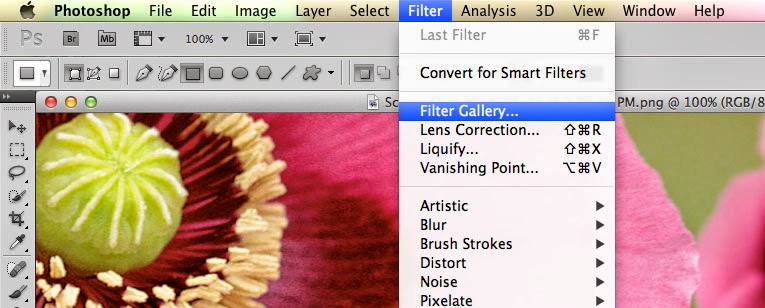
- Filters. The filters are typically what we think of when we think of Photoshop, they are special effects that are applied to images to give them different looks. Each filter can draw out a different effect, color, or reduce those things. Filters work even better when you know how to pair them with other abilities of Photoshop. To get to the filters, simply look at the top menu bar, click Filter > Filter gallery > then choose a filter.
- Keyboard shortcuts. There are several keyboard shortcuts that will help you do your work even faster and look like a pro.
- V= move tool
- F= flips through screens
- Space= temp hand key
- B= paintbrush
- D= Sets the background/foreground colors as default
- X= flips between foreground and background colors
- E= Eraser
- S= Stamp tool (also clone tool)
- W=Quick selection
- Ctrl+J= duplicates layer you have last selected
- Color enhancing. Color is one of the main things you do with Photoshop, you want your photos to appear full of life and be attractive. Two of the main things you can do here are toggle with saturation and vibrance. Vibrance is the ability to increase the saturation of colors that are less saturated; so, it tends to balance out the color in a photo. Saturation is the ability to increase the intensity of all the colors in your image; so the intensity differences are still there but they're all more intense.
- Add sharpness and detail. Adding sharpness to your image can make it look much more detailed and awesome. If you are unsure of how much sharpness to add, then just add a little; if you add to much, it can make the photo look bad and that could have a worse effect than not sharpening at all.
If you are looking for a graphic designer in Chicago, then contact Integraphix. We have done graphic design work for some of the top brands in Chicago and would love to help yours!
Thursday, February 27, 2014
What You Need to Know as a Graphic Design Student
As a graphic design student, it can be stressful to think about all the things you need to know when entering the real world in your profession. Your job is to be creative and make creative things; the pressure to do that can make it hard to do that. So what are some things you should know if your course to become the world's next amazing graphic designer?- There are few "firsts" in todays time; this means that the likelihood that you are alone in doing something is minimal. This can be very uplifting because the times when something seems impossible or strange, you can remember that someone else has (most likely) gone through that same scenario. In areas like graphic design, web design, marketing, and advertising, most things are actually just adopted and altered, very few things are original anymore.
- You may be great at what you do but there is always someone better or knows something you don't. The lesson from this is to remain humble and not let success get to your head and make you feel invincible. If you get awesome at what you do, fantastic; however, if the "fame" gets to your head and you become difficult to work with, you will have no one to work with.
- Set goals for yourself so you have something to aim at. How do you know you have accomplished something if you do not know where the end is? Better yet, where the beginning is?
- It is hard work, it takes energy. You may have months that require you to create 15 logos, you will need to be energetic enough to get done what needs to get done and done well.
- Getting your foot in the door can be tricky but it can be easier if you remember to embody characteristics like a great work ethic, energy, great personality, and patience. Remember to have the great personality and patience. The personality also means having a good self-image; so be humble yet confident and not self-depreciating and insulting.
- Go for quality, not quantity, when curating your portfolio. It's better to have a few awesome examples instead of 20 mediocre.
- A great way to get your foot in the door with places is to do internships. Don't just do one and then quit, do a few. If you can get paid, then that's great, but realize the vast majority of places do not pay. Also, do not waste your internship; learn and remember and then implement!
- When you are in the work force as a designer, get to know a printer and make them a close work-friend. Having a good relationship with a printer will be a lifesaver.
- Ask questions and for opportunities. If you do not know the answer to something, ask. If you want to have your work included in an exhibit, ask.
- Take criticism well. Some people do not do great at giving constructive criticism so don't beat yourself up if they don't.
So go be confident in your efforts to become a real world graphic designer. As a Chicago graphic design firm, Integraphix loves the world of art and helping others get there. If you have any questions, contact us.
Subscribe to:
Posts (Atom)